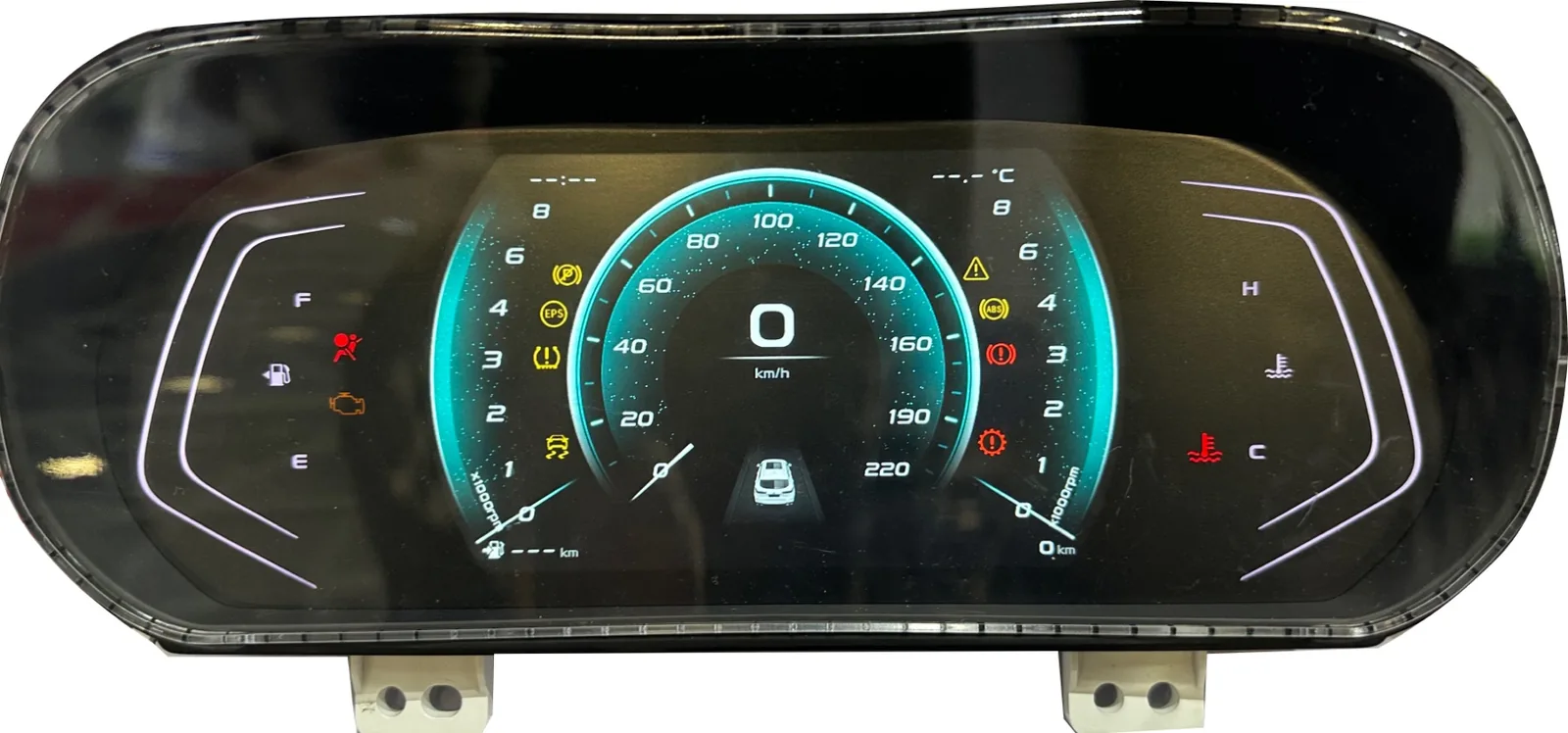
How Should the Automotive HMI Function Map Be Prepared?
Before requesting a sample, classify every front-panel zone as a printed-only graphic, permanent or illuminated legend, display window, tactile key, FSR input, indicator or unused surface. The map should also show the normal viewing direction, user reach area and the signal route from each active zone.
Connect that function map to the bezel, display, support ribs, gasket, light source, tail exit and connector space. This prevents a decorative overlay from being quoted where a working input layer is required, or a keypad from being sampled without enough housing support.
The approved map should identify which requirements are checked at part level and which remain module or vehicle tests. Use the same revision reference on the artwork, housing drawing and electrical information supplied for quotation.
Which Functions Need a Dedicated Physical Input?
Euro NCAP's 2026 protocol overview says its new HMI assessment considers the placement, clarity and ease of use of essential controls, including physical buttons for commonly used functions. That does not prescribe one keypad layout, but it gives vehicle teams a useful allocation question before artwork is frozen.
Frequent or time-sensitive actionsReview whether the operator needs a fixed position, tactile confirmation or a dedicated illuminated legend instead of a screen-only path.
Display-led functionsKeep low-frequency settings in the display when a physical key would add clutter, circuit routing and sealing work without a clear user benefit.
Buyer decisionMark every zone as printed only, display window, tactile input, sensor input or backlit indicator, then show the normal viewing and reach position.
Component Stack Baoshengda Can Review
The component stack may combine visual, input, lighting and electrical layers. Each layer must be checked against the customer's bezel, display, support ribs, gasket and connector access.
Graphic OverlayVisual interface layer for dashboard symbols, windows, icons, dead-front effects and automotive control graphics.
Membrane SwitchControl input layer for buttons, mode selection, vehicle functions, center console controls and auxiliary panels.
Backlit KeypadNight visibility support for dashboard icons, illuminated key areas, warning symbols and low-light operation.
FSR Pressure SensorOptional force-sensitive input layer when the customer defines the contact area, preload, threshold and readout method.
Printed Circuit and Flex TailSignal route from key or sensor zones to the customer's connector, PCB or controller.
Adhesive and Support StackRear adhesive, spacer and housing support geometry that keep the key feel, edge contact and window position stable after assembly.
Mounted-Sample Failure Modes to Catch Early
A flat sample can look acceptable while the assembled module fails. Review the physical interface in the intended housing before releasing artwork, adhesive die lines or tail geometry.
Key Feel Changes After Mounting
Backlight and Window Mismatch
- LED hot spots or dark legends appear in the real stack
- Bezel shadow clips an icon or display border
- Dead-front contrast changes between day and night
Adhesive Edge Lift
- The housing landing is too narrow or textured
- Curvature loads the overlay edge
- Cleaner, heat or surface contamination weakens contact
Tail and Connector Strain
- The tail exits into a tight bend or sharp edge
- The stiffener faces the wrong mating direction
- The connector cannot be serviced without peeling the panel
Applications
Automotive HMI panels are used where vehicle electronics need durable, visible and easy-to-operate control surfaces.
Vehicle Dashboard Systems
Dashboard overlays, illuminated symbols, display windows and instrument panel interface layers.
EV Control Interfaces
EV control panels, charging-related interfaces, thermal module controls and custom electronic vehicle input areas.
Infotainment Systems
Backlit buttons, function keys, dead-front graphics and control areas for vehicle infotainment modules.
Steering Wheel Controls
Compact keypad and overlay structures for repeated tactile input in driver control zones.
Center Console Panels
Custom membrane switches, overlays, indicators and backlit symbols for center console control surfaces.
Automotive Instrument Clusters
Graphic overlays, windows, pointer areas, transparent zones and dead-front display effects for instrument clusters.
Component Boundary and Project Ownership
A useful RFQ separates the custom front-panel component from the systems that remain outside the supplier's scope.
Baoshengda Can Review
- Overlay artwork, legends, windows and surface finish
- Membrane, tactile, FSR and backlight layer stack
- Adhesive landing, gasket clearance and housing support
- Flex-tail exit, connector pitch, stiffener and contact side
- Mounted sample evidence for key feel, lighting and fit
OEM or Tier 1 Owns
- Function allocation and driver-interaction logic
- Display module, ECU, software and vehicle network
- Safety analysis, diagnostic strategy and fail states
- Environmental specification and validation plan
- Module and vehicle-level release approval
Quality and Testing

These real instrument-overlay samples show the component boundary: printed scales, icon zones, pointer openings and display windows, not a complete vehicle cluster. Quality checks should be tied to the customer's drawing, housing and approval plan.
- Temperature cycling test support
- Vibration resistance test support
- UV aging test support
- Electrical stability test
- Mechanical life cycle test
- Adhesion and bonding test
- RoHS / SGS compliance support
- IATF 16949 manufacturing system
Customization Options
Dashboard and Graphics
- Dashboard layout design
- Dead-front display design
- Material selection including PC, PET and PMMA
Lighting
- Backlight color customization
- LED, LGF or EL options
- Night visibility and icon readability review
Sealing and Durability
- Front-seal and adhesive geometry against the project target
- Material choices for the specified temperature, UV and cleaning exposure
- Final assembled sealing performance confirmed by the customer
Input and Circuit Options
- Tactile or non-tactile membrane keys
- FSR input areas when the readout method is defined
- Custom tail exit, connector and contact-side details
Design Information Needed for Quotation
For an automotive HMI component, send enough information to connect the front artwork to the real housing, input function and validation stage.
- Front artwork plus rear housing, bezel and support-rib drawing
- Function map: printed only, display window, tactile key, sensor input or indicator
- Controls that need a fixed physical position and their normal use condition
- Day, night, backlight color, dead-front, viewing-angle and dimming targets
- Overlay material, surface finish, cleaning agent and environmental specification
- Adhesive landing, gasket, curvature and mounted-thickness limits
- Tail exit, bend area, connector pitch, pin count, stiffener and contact side
- Prototype quantity, annual quantity, validation stage and known sample failures
Automotive HMI components engineering review PDF
Use the construction, mounted-sample checks and quotation checklist with your current drawing. This note is not a fixed performance specification, test report or finished-equipment approval.
Download Engineering Review PDFRequest Product BrochureRevision 2026-10-15. Project requirements and acceptance criteria are agreed before sampling.
FAQ
What automotive HMI components can Baoshengda manufacture?
Baoshengda can manufacture component-level front-panel parts such as membrane keypads, graphic overlays, backlit or dead-front legends, display windows, FSR input layers and flex-tail circuits according to the customer's drawings.
Does Baoshengda supply the complete automotive HMI, ECU or software?
No. Baoshengda's scope is the custom interface component and sample review. The vehicle maker or Tier 1 remains responsible for function allocation, display and ECU hardware, software, network communication, safety analysis and vehicle-level validation.
Can an automotive HMI component include backlighting?
Yes. LED, LGF or project-appropriate lighting can be reviewed for icons, key zones, display borders and dead-front areas. Day, night and mounted-housing appearance should be approved on the real sample stack.
What should be checked after the HMI panel is mounted?
Check key feel, icon and window registration, light leakage, bezel shadow, adhesive edge contact, tail bend, connector access and cleaning response in the actual housing.
Does an IATF 16949 manufacturing system replace vehicle validation?
No. The manufacturing system supports process control, but each customer must define and approve the part specification, test plan, assembled module performance and vehicle-level requirements.
What files make an automotive HMI RFQ useful?
Send the front artwork, housing-side drawing, display and bezel geometry, physical-key function list, lighting zones, material and cleaning requirements, tail and connector details, sample quantity and validation stage.
Related Component Families
Use the HMI panel hub for the full front-panel workflow, or open the specific component page that matches the drawing.
Related Automotive HMI Buyer Guides
Use these guides to review control allocation, tactile feedback, lighting and dashboard-overlay evidence before freezing the interface.
Scope at a Glance
Baoshengda's quoted scope can include these custom component families when the drawing calls for them:
- Graphic overlays and display windows
- Membrane keypads and tactile zones
- Backlit and dead-front legends
- FSR input layers
- Printed circuits, flex tails and connectors
This component scope does not include the complete display, ECU, vehicle software, safety architecture or vehicle certification.
Need a component-level automotive HMI review?
Send the front artwork, housing section, function map, lighting zones, tail route and sample quantity. Baoshengda can review the manufacturable interface stack before prototype development.