
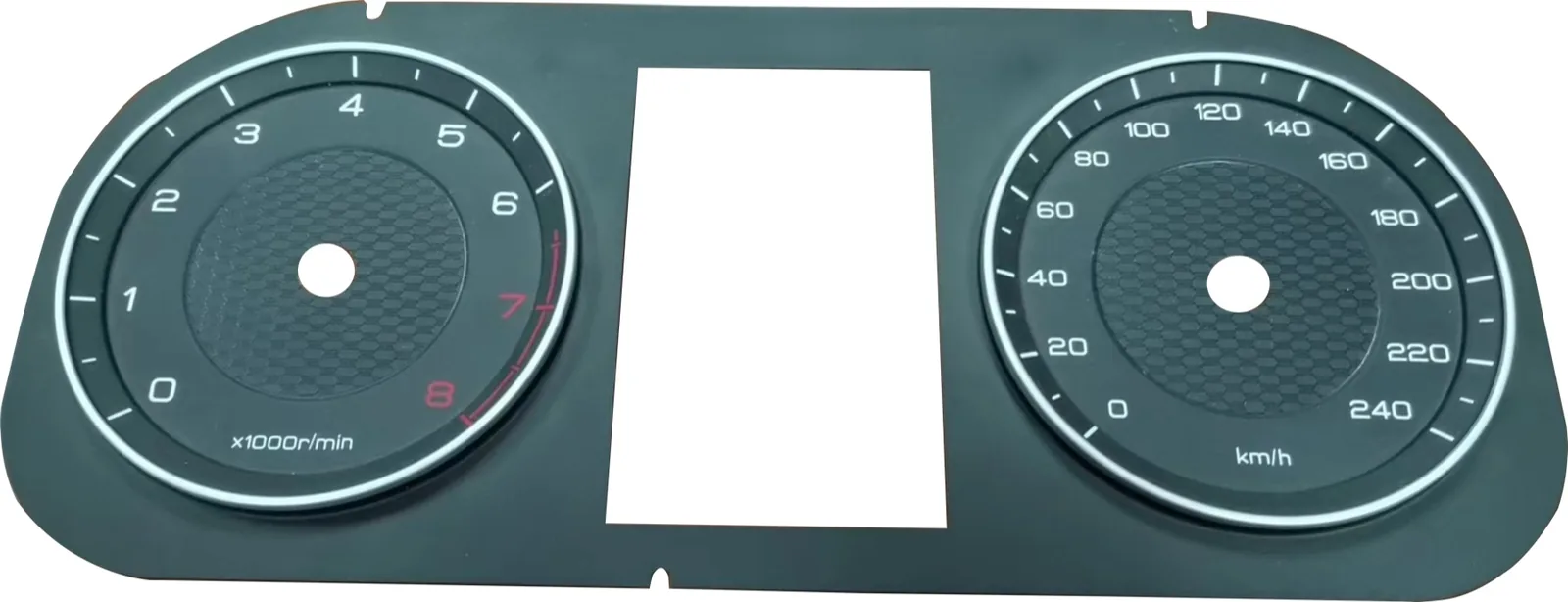
Quick answer: the return of physical controls in automotive HMI does not mean every screen will disappear. It means safety-critical and frequently used functions need clearer human feedback. For buyers of dashboard overlays, touch panels, membrane switches, and backlit control panels, the practical work is to define which functions need a tactile or direct-control surface, then confirm printing, lighting, material, adhesive, tail routing, and sample approval before production.
Euro NCAP's 2026 protocol changes and recent automotive coverage both point to the same buyer concern: drivers should not need to search through a screen for common controls while the vehicle is moving. For component buyers, this trend is not only a styling question. It changes how HMI panels, graphic overlays, symbols, backlight windows, and switch structures should be specified.
What changed in the HMI discussion?
For several years, many vehicle interiors moved more functions into large touchscreens. That simplified the cabin visually, but it also created a usability problem for controls that drivers use often or need quickly.
The current discussion is more balanced. Screens still handle navigation, media, vehicle settings, and software features. Physical controls, tactile surfaces, stalks, rotary controls, membrane keys, or dedicated icon areas are being reconsidered for functions where quick recognition matters.
For an automotive dashboard overlay or center-console panel, this creates a clear design question: which functions belong on the display, and which need a dedicated control position that the driver can locate with less visual effort?
Which controls should buyers discuss first?
Start with the functions used while driving or under stress. These are usually the controls where tactile feedback, clear icon position, or direct access matters most.
Discuss:
- Hazard warning and emergency functions.
- Defogging, demisting, and climate shortcuts.
- Wiper, light, and signal-related controls.
- Drive-mode or safety-assist acknowledgement controls.
- Frequently used audio or temperature controls.
- Warning icons that must remain clear under backlight.
A buyer does not need to decide the full electronics structure at the first RFQ stage, but the supplier should know which areas are only printed graphics and which areas may require switch layers, light windows, embossing, or a touch circuit.
What does this mean for dashboard overlay design?
A dashboard overlay is not just a printed faceplate. It has to work with the display, light source, housing, lens, adhesive, and circuit or sensor layer behind it.
Check these points early:
- Display window size and tolerance.
- Icon location relative to LED or light guide position.
- Color density for day and night visibility.
- Matte, gloss, anti-glare, or anti-fingerprint surface requirements.
- Scratch resistance expectations for cleaning and daily use.
- Whether any area needs embossing, dome feel, or capacitive touch.
If the overlay is used around a curved instrument cluster or recessed display, send the housing photo or 3D model with the inquiry. A flat artwork file alone does not show whether the adhesive area and edge fit are enough.
How should backlit icons be specified?
Backlit icons are common on automotive panels, but they are also easy to get wrong. The printed color may look acceptable in daylight and then appear uneven, weak, or too bright at night.
Before sampling, confirm:
- Which icons are backlit and which are only printed.
- Light color, brightness target, and viewing distance.
- Whether the icon must be visible when the light is off.
- Required opacity around the symbol to prevent light leakage.
- Whether the panel uses LED, light guide, EL, or another lighting method.
- Night appearance under the real housing and lens stack.
For early prototypes, a light-table review is useful. For final approval, test the sample with the actual light source and housing.
When does a tactile membrane switch still make sense?
Tactile membrane switches are still useful when the buyer needs a thin, sealed, custom interface with repeatable button position and printed graphics. They are especially practical for auxiliary control areas, vehicle accessories, charging equipment, industrial vehicles, agricultural machines, and dashboard modules where space is limited.
A tactile design may use metal domes, embossed keys, spacer layers, printed circuits, FPC, or a hybrid structure. The right choice depends on key size, actuation force, working temperature, expected service life, and how the panel is assembled.
Confirm:
- Tactile or non-tactile key feel.
- Button size and spacing.
- Actuation force target if known.
- Dome position and support area.
- Tail exit direction and connector pitch.
- Whether the user may operate the control with gloves.
What material should buyers consider?
Automotive HMI panels often need better surface performance than ordinary indoor equipment labels. Sunlight, heat, cleaning liquid, abrasion, and repeated touch can all change the material decision.
Common checks include:
- PET or PC overlay material.
- UV exposure and yellowing risk.
- Chemical exposure from cleaners or hand contact.
- Scratch and abrasion expectation.
- Anti-glare or anti-fingerprint coating.
- Adhesive compatibility with plastic, painted, or textured housing.
Do not choose material by thickness alone. Ask the supplier to explain the material stack for the real use environment.
What should buyers send for a better RFQ?
For an automotive dashboard overlay or physical-control HMI panel, send more than a product photo. A useful RFQ package usually includes:
- 2D drawing with outline, hole, and display-window dimensions.
- Artwork file with color and icon requirements.
- Housing photo, 3D model, or mounting-surface description.
- Function list: printed only, backlit, tactile, capacitive, or sensor area.
- Lighting method and icon visibility requirement.
- Tail route, connector pitch, pin count, and contact side.
- Surface finish, anti-glare, scratch, or cleaning requirements.
- Target sample quantity and production quantity.
- Any known failure from the previous version.
This information helps the supplier quote the real structure instead of guessing from a picture.
Sample approval checklist before production
Before approving an automotive HMI overlay or membrane switch sample, check:
- Printed scale, icon, and warning symbol position.
- Fit around the display window and housing edge.
- Day and night visibility of backlit areas.
- Key feel after the panel is mounted.
- Tail bend radius and connector mating.
- Adhesive contact area and edge-lifting risk.
- Surface appearance after normal cleaning.
- Packaging protection for glossy or coated surfaces.
If the sample passes on a desk but fails in the housing, treat the housing result as the real result.
Practical takeaway
The physical-control discussion is a useful signal for automotive HMI buyers. It reminds teams to separate software functions from controls that need fast recognition, tactile confidence, or dedicated icon positions. For dashboard overlays, graphic panels, membrane switches, and backlit HMI parts, the earlier these decisions are written into the RFQ, the fewer changes appear after sampling.
Baoshengda can review drawings, housing photos, display-window locations, backlight needs, and tail routing before quoting a custom automotive overlay or control panel. Clear input makes the first sample closer to production intent.
Need help reviewing a structure?
Send your drawing, photos, application, and quantity. Baoshengda can help check the structure before sampling.
Send Drawing for Quote