
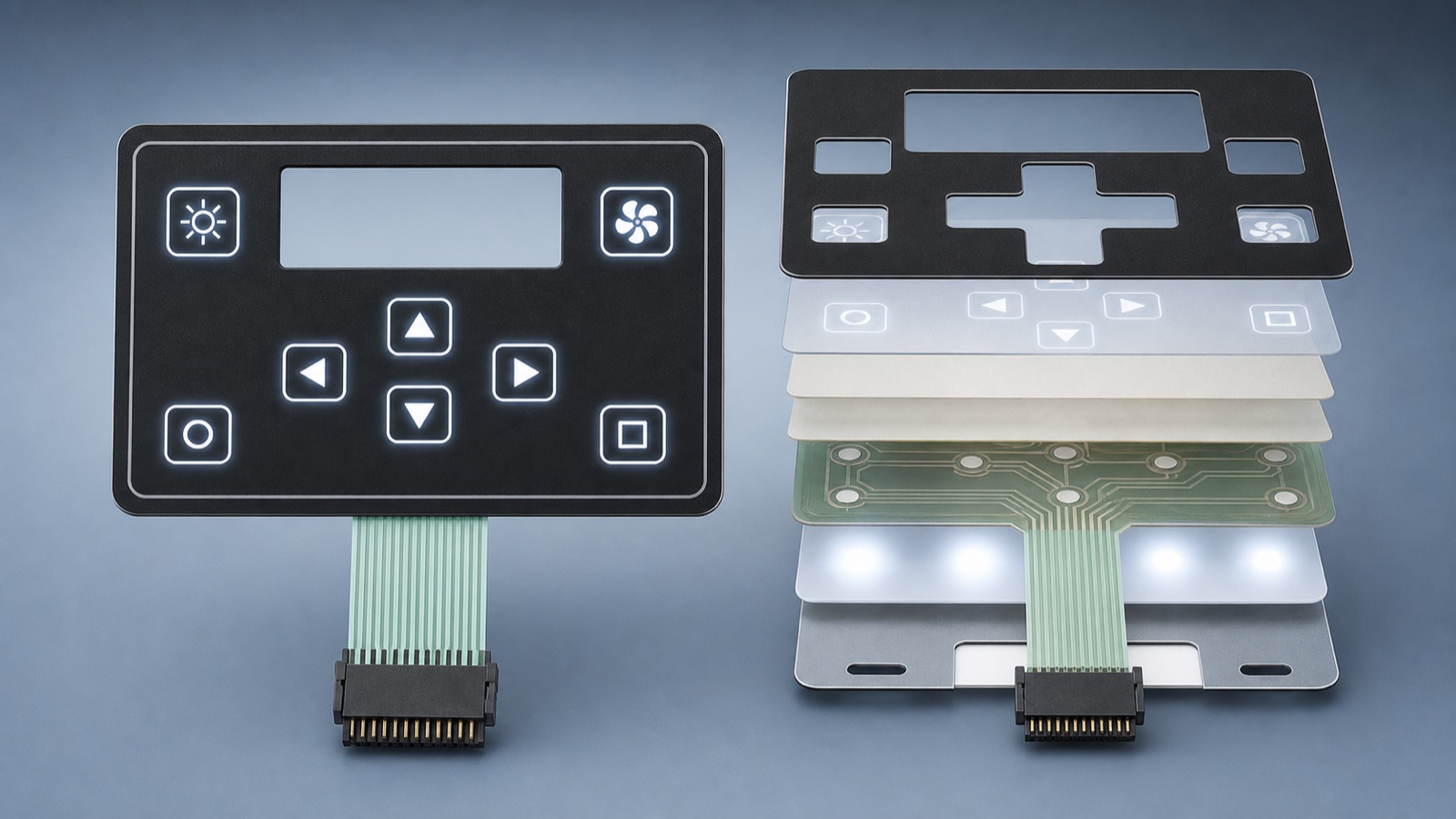
Quick answer: if your control panel has to stay readable in strong daylight and then remain clear again at dusk or night, do not approve the backlit HMI from icon artwork alone. The important checks are dead-front contrast in direct light, anti-glare surface choice, display-window stack-up, light leakage around icons, and whether the assembled panel still looks balanced after the housing, lens, and backlight are all working together. If your project needs illuminated keys, hidden icons, or a thin front-panel structure, the backlit membrane switch page is the closest product reference.
Why this buyer question is current
On June 22, 2026, the National Weather Service Houston/Galveston forecast office highlighted continued heat concerns for Southeast Texas, and the Houston point forecast kept high heat and summer-storm conditions in view for field work. That is a useful reminder for buyers of service terminals, handheld controllers, charging equipment, outdoor instruments, and access devices: the panel may be checked at a desk, but it will be used under hard sunlight, hot enclosures, and changing light later in the day.
In that condition, readability problems show up fast. A panel can look sharp indoors, then lose icon contrast outdoors, show a cloudy window, or push too much light through one symbol while another disappears beside it.
The buyer problem is not only brightness
Many buyers ask whether the backlight is bright enough. That is only part of the review.
The larger question is whether the HMI stays readable across the full operating cycle:
- Strong daylight when the panel surface is reflecting sky or operator movement.
- Heat-soaked housing conditions after the equipment has been sitting in sun.
- Late-shift or low-light use when the backlight must reveal icons without light bleed.
- Cleaning and repeated touch use that can change surface appearance over time.
One common mistake is approving the icon artwork before the optical stack is settled. Another is tuning the LEDs for a dark room, then discovering in field trials that the window, ink, and surface finish are fighting each other in sunlight.
What to confirm in the optical stack before sample approval
Start with the front viewing condition, not the PCB.
- Confirm whether the overlay surface should be matte, fine-texture, or another anti-glare finish instead of a glossy decorative finish.
- Check dead-front printing in both states: icons hidden enough when off, but still easy to read when lit.
- Review the display-window border and transparent area. A clear window can look too reflective if the lens, air gap, or adhesive choice is wrong.
- Match translucent ink density to the real LED or light-guide output. Good icon shape does not guarantee good contrast.
- Check whether the icon size, stroke width, and spacing are realistic for bright-day viewing from the real operator distance.
- Confirm whether the product needs glove operation, because larger viewing distance and thicker protective lenses often change what reads clearly.
If the project combines keys, indicator icons, and a display window in one panel, review them together. A panel that balances one area well can still fail at the window or side icons.
What heat can change inside a backlit HMI panel
Heat exposure does not only affect the enclosure. It can change how the front panel looks.
- An adhesive or window stack can show more haze or edge reflection after the unit warms up.
- A dark overlay can absorb heat and change the visual balance between lit and unlit areas.
- Light leakage may become more obvious when the panel expands slightly or sits against an uneven housing surface.
- A thin panel that looks uniform on the bench may show brighter hot spots after it is pressed against support ribs or screw points.
- The tail and connector route can push the panel stack unevenly from behind, which changes window flatness or key feel.
These are assembled-system problems. The backlight, overlay, housing, and support parts all affect what the buyer finally sees.
Run assembled checks in midday sun and in low light
A useful readability trial should not stop at a bench power-on photo.
- Mount the panel into the actual enclosure or a close mockup.
- View it outdoors or under strong directional light close to the real service angle.
- Check the panel again after the housing has warmed up, not only at room temperature.
- Compare icons and window readability with the backlight off, at normal brightness, and at the highest intended brightness.
- Look for hot spots, edge glow, uneven icon intensity, and reflections across the display window.
- Check whether fingerprints, dust, or cleaner residue make the window harder to read after wiping.
- Review the same panel again in low light so daylight tuning does not create a harsh night-time result.
A panel that passes both midday glare and low-light visibility is usually much safer than one approved from studio lighting only.
RFQ details to send for a backlit HMI readability review
Send these items before asking the supplier to lock the sample:
- Front-panel drawing, overall size, and the real viewing distance.
- Artwork with icon locations, hidden-icon areas, and display-window dimensions.
- Housing photo or drawing that shows bezel depth, support ribs, and mounting pressure points.
- Backlight target: indicator only, key-area lighting, window lighting, or full mixed HMI panel.
- Preferred surface finish such as matte, anti-glare, texture, or easy-clean coating.
- Day and night use conditions, including whether the unit sits in direct sun.
- Lens thickness, cover material, and whether the stack includes air gap, OCA, or another bonding method.
- Brightness concern, glare complaint, or any failure seen on the current sample.
If your team is ready for engineering review, send the package through the Request Quote form so the optical stack, lighting balance, and assembled readability trial can be checked together.
Final decision before you approve the sample
For backlit HMI panels, brightness alone is not the pass condition. Buyers should approve the sample only after checking anti-glare surface, dead-front contrast, window reflection, light leakage, and assembled readability in both strong daylight and low light. That review is usually cheaper than revising artwork and lighting after the first field trial exposes a panel the operator cannot read quickly.
Need help reviewing a structure?
Send your drawing, photos, application, and quantity. Baoshengda can help check the structure before sampling.
Send Drawing for Quote